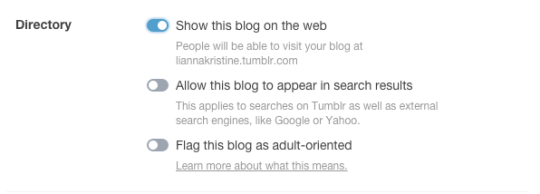
A couple of months ago, we changed “ignore” to “block” and added some new features that increase privacy. Now we’re introducing a “Show this blog on the web” toggle that gives you even more control over who sees your stuff. If you’re stressed about lurkers, this is the toggle for you.
When you disable “Show this blog on the web:”
Anyone who tries to visit your blog on the web (ie. support.tumblr.com) will see an error page
Someone following your blog can only see your posts on their dashboard when they’re logged in
Logged-in users who know your blog exists can follow it from the follow page here: tumblr.com/following
There’s no sacrifice of social features! Your followers can read, like, reply to, and reblog your posts
You can still block anyone from following your blog
To hide any non-group blog from the web, click “Settings” under the account menu at the top of the dashboard, then click the name of the blog you’d like to update on the right side of the page. Scroll down to the directory portion of your blog settings and toggle the “Show this blog on the web” option off.
Voila! Well, actually, pas ici! Your blog disappears from the web in a plume of smoke.
THIS IS EXACTLY WHAT IVE BEEN HOPING FOR MY ENTIRE LIFE ON THIS WEBSITE !!!!!!!!!!

 Kirkwall Was Totally Built On a Hellmouth